Running 100 Wasm Containers on a Raspberry Pi (with 903 MB of RAM)

Photo by Wolfgang Hasselmann on Unsplash
In my first article, I built WebAssembly containers with Atym and got application binaries under 23 KB. In the second, I proved the same .wasm ran on RISC-V without recompilation. Both articles tested single containers. Then someone asked on LinkedIn about multi-container scenarios: isolation, communication, memory overhead in medical and safety-critical environments. Fair question. Time to answer it.
On embedded devices, “several containers” isn’t a thought experiment. A factory sensor node might run a data collector, a local aggregator, and a watchdog. Three containers, talking in real time, on a board with less than a gigabyte of RAM. I installed Docker on this Pi to measure: the daemon alone eats 113 MB before your first container starts, and each container adds about 15 MB of overhead. On 903 MB, that math gets uncomfortable quickly.
I have a Raspberry Pi 3B+ with 903 MB of usable RAM. Time to find out how many Wasm containers it can actually handle, and whether they can talk to each other.
Why the Raspberry Pi 3B+
This board is a deliberate choice, not a default.
- CPU: Broadcom BCM2837B0, ARM Cortex-A53 (aarch64)
- RAM: 903 MB usable
- OS: Armbian 26.2.1 Trixie, kernel 6.18.9-current-bcm2711
- Runtime: Ocre 0.7.0, WAMR 2.4.3
The Pi 3B+ is the first board in this series where the full Atym commercial stack is available, with pre-built arm64 binaries and no compilation required. But the real reason I picked it is the memory constraint. 903 MB is enough for a Linux system to function. It’s not enough for Docker to breathe.
I installed Docker on the Pi to get real numbers. The daemon eats 113 MB of RSS at cold start (72 MB for dockerd, 41 MB for containerd). Each nginx container adds about 4.5 MB for its own process plus 11 MB for the containerd-shim that babysits it, so roughly 15 MB per container. Ten nginx containers brought the total Docker footprint to 261 MB. Factor in the OS and you’re running out of headroom fast.
If Wasm containers are as lightweight as advertised, this board should tell a very different story.
Setting up the Pi
I provisioned the Pi using Ansible (playbooks on GitHub). The setup installs build tools, clones WAMR and the Ocre runtime, builds both from source, and creates convenience symlinks. Building from source isn’t strictly necessary (pre-built binaries exist) but I wanted to see if anything needed tweaking on this board. Old LFS habits die hard.
WAMR compiles in under two minutes. The Ocre runtime, with its recursive submodules and cmake dance, takes closer to ten. But once it’s done, you have three binaries:
| Binary | Size | Purpose |
|---|---|---|
| ocre_mini | 713 KB | Minimal runtime, runs a single container |
| ocre_cmd | 717 KB | Full CLI with container management |
| iwasm | ~600 KB | Standalone WAMR runtime |
All native aarch64, all under 1 MB. Compare that to dockerd at 92 MB (plus containerd at 44 MB).
I also installed the WASI SDK v29 (pre-built arm64 binaries), which means the Pi can compile C code directly to .wasm. No x86 dev container needed: the entire toolchain runs on-device.
Building .wasm samples on-device
For the first two articles, I built all .wasm samples inside the Atym dev container on x86 and copied them to the target board. This time, I built everything natively on the Pi itself.
The Ocre SDK samples compile the same way everywhere:
cd ocre-sdk/generic/messaging/publisher
mkdir build && cd build
cmake ..
make
Three seconds later: publisher.wasm, 21 KB. I built the full set:
| Sample | Size | Purpose |
|---|---|---|
| hello-world.wasm | 17 KB | Baseline, prints ASCII banner |
| publisher.wasm | 21 KB | Publishes to test/topic every 2s |
| subscriber.wasm | 21 KB | Subscribes to test/ prefix |
| publisher_inside.wasm | 21 KB | Publishes temperature/inside every 2s |
| publisher_outside.wasm | 21 KB | Publishes temperature/outside every 4s |
| subscriber_temp.wasm | 21 KB | Subscribes to temperature/ prefix |
| shared-filesystem-writer.wasm | 31 KB | Writes to /shared/shared_data.txt
|
| shared-filesystem-reader.wasm | 30 KB | Reads from /shared/shared_data.txt
|
| sensor-rng.wasm | 19 KB | Random sensor data via Ocre API |
Every binary is between 17 and 31 KB. For context, the favicon on most websites is larger than any of these containers.
How ocre_cmd manages containers
Before running multiple containers, I needed to understand how the runtime actually works on Linux.
Reading the Ocre source code revealed something I didn’t expect: ocre_cmd on Linux is a single-command CLI, not an interactive shell. Each invocation creates its own runtime context, executes one command, and exits. You can’t just run ocre_cmd run publisher.wasm in one terminal and ocre_cmd run subscriber.wasm in another and expect them to chat.
For containers to exchange messages via the Ocre messaging API, they must live in the same runtime context. The messaging system is an in-process pub/sub broker, not a network service, so separate processes can’t share it.
Loading images
Images in Ocre are raw .wasm files stored in a directory. No OCI manifest parsing at the image-store level. You just copy .wasm files:
cp ~/wasm-containers/*.wasm ~/ocre-runtime/src/ocre/var/lib/ocre/images/
Then verify:
ocre_cmd image ls
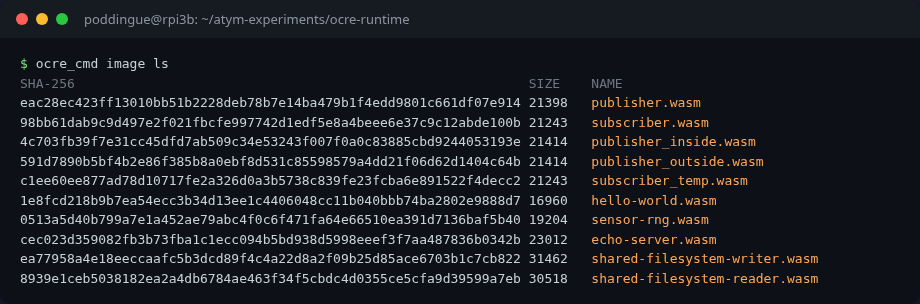
SHA-256                                                          SIZE    NAME
eac28ec423ff13010bb51b2228deb78b7e14ba479b1f4edd9801c661df07e914 21398   publisher.wasm
98bb61dab9c9d497e2f021fbcfe997742d1edf5e8a4beee6e37c9c12abde100b 21243   subscriber.wasm
4c703fb39f7e31cc45dfd7ab509c34e53243f007f0a0c83885cbd9244053193e 21414   publisher_inside.wasm
591d7890b5bf4b2e86f385b8a0ebf8d531c85598579a4dd21f06d62d1404c64b 21414   publisher_outside.wasm
c1ee60ee877ad78d10717fe2a326d0a3b5738c839fe23fcba6e891522f4decc2 21243   subscriber_temp.wasm
1e8fcd218b9b7ea54ecc3b34d13ee1c4406048cc11b040bbb74ba2802e9888d7 16960   hello-world.wasm
No image pull, no registry authentication, no layer deduplication. Just files. For an embedded device, that simplicity is a feature.
A quick sanity check: run a single container to make sure everything works.
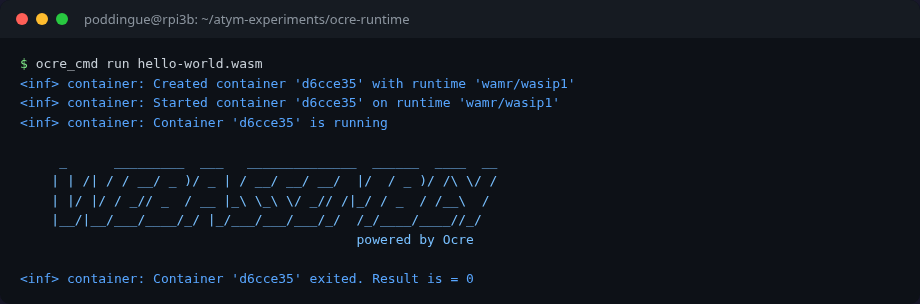
The multi-container problem
Since each ocre_cmd invocation creates a separate runtime context, I wrote a custom C test harness that creates multiple containers programmatically using the Ocre C API:
struct ocre_container *subscriber =
    ocre_context_create_container(ctx, "subscriber.wasm",
                                  "wamr/wasip1", "subscriber",
                                  true, &args);
ocre_container_start(subscriber);

struct ocre_container *publisher =
    ocre_context_create_container(ctx, "publisher.wasm",
                                  "wamr/wasip1", "publisher",
                                  true, &args);
ocre_container_start(publisher);
The true parameter means “detached,” so the container runs in its own thread. The args include ocre:api as a capability, which grants access to the Ocre SDK functions (timers, messaging, sensors). Without this capability, the runtime silently denies SDK access. More on that later.
If you know Docker, think -d for detached mode. Capabilities work like --cap-add.
Experiment 1: Publisher/subscriber messaging
The Ocre messaging API is a topic-based pub/sub system. Publishers send to named topics, subscribers register for topic prefixes.
// Publisher side (inside publisher.wasm)
ocre_publish_message("test/topic", "text/plain", payload, len);

// Subscriber side (inside subscriber.wasm)
ocre_subscribe_message("test/");   // prefix matching
ocre_register_message_callback("test/", handler);
The subscriber subscribes to test/, which matches any topic starting with that prefix: test/topic, test/temperature, test/anything.
I loaded both containers in the same runtime context and let them run for 10 seconds:
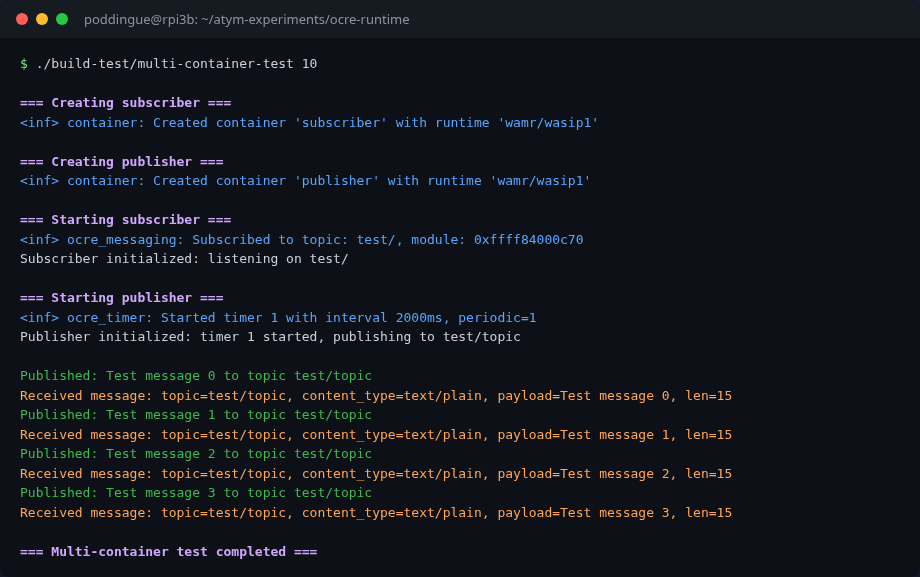
=== Starting subscriber ===
Subscriber initialized: listening on test/

=== Starting publisher ===
Publisher initialized: timer 1 started, publishing to test/topic

Published: Test message 0 to topic test/topic
Received message: topic=test/topic, content_type=text/plain, payload=Test message 0
Published: Test message 1 to topic test/topic
Received message: topic=test/topic, content_type=text/plain, payload=Test message 1
Published: Test message 2 to topic test/topic
Received message: topic=test/topic, content_type=text/plain, payload=Test message 2
Published: Test message 3 to topic test/topic
Received message: topic=test/topic, content_type=text/plain, payload=Test message 3
Four messages in 10 seconds, exactly as expected (the publisher uses a 2-second timer). The subscriber receives every message. No drops, no ordering issues.
Experiment 2: Three containers, two publishers
A single publisher/subscriber pair is the hello-world of messaging. The real test is fan-in: multiple publishers, one subscriber, topic differentiation.
I set up three containers:
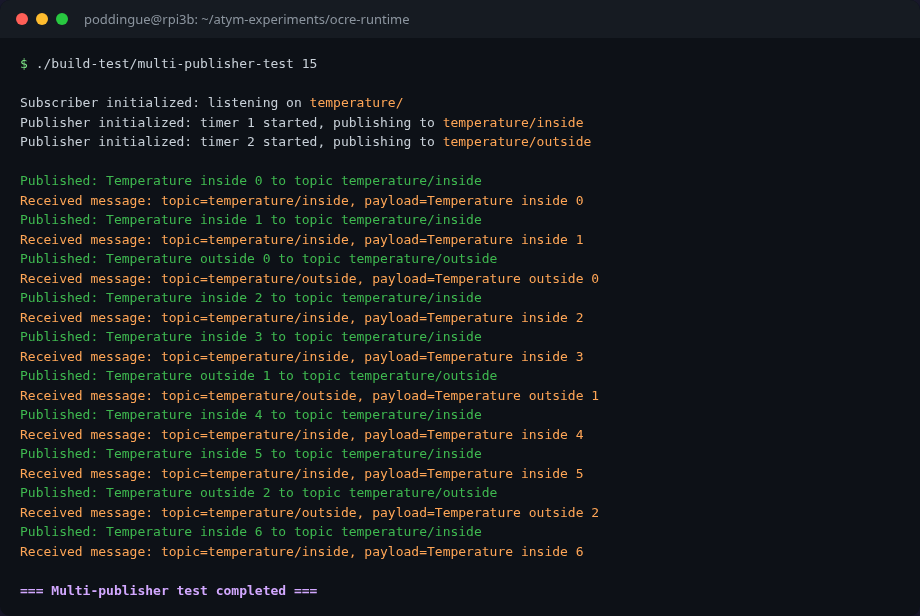
-
publisher_inside.wasm: publishes totemperature/insideevery 2 seconds -
publisher_outside.wasm: publishes totemperature/outsideevery 4 seconds -
subscriber_temp.wasm: subscribes totemperature/prefix
Subscriber initialized: listening on temperature/
Publisher initialized: publishing to temperature/inside (2s interval)
Publisher initialized: publishing to temperature/outside (4s interval)

Published: Temperature inside 0 to topic temperature/inside
Received message: topic=temperature/inside, payload=Temperature inside 0
Published: Temperature inside 1 to topic temperature/inside
Received message: topic=temperature/inside, payload=Temperature inside 1
Published: Temperature outside 0 to topic temperature/outside
Received message: topic=temperature/outside, payload=Temperature outside 0
Published: Temperature inside 2 to topic temperature/inside
Received message: topic=temperature/inside, payload=Temperature inside 2
Published: Temperature inside 3 to topic temperature/inside
Received message: topic=temperature/inside, payload=Temperature inside 3
Published: Temperature outside 1 to topic temperature/outside
Received message: topic=temperature/outside, payload=Temperature outside 1
The interleaving is exactly right: inside messages arrive every 2 seconds, outside every 4, and the subscriber catches both via the temperature/ prefix. Three containers, zero configuration, no network sockets, no message broker process.
That’s the pattern you see in real deployments: multiple sensors reporting to a single aggregator. With Docker, you’d need a separate message broker (Mosquitto, Redis, NATS), network configuration, DNS resolution between containers. Here the messaging is just part of the runtime.
Experiment 3: Shared filesystem
Messaging isn’t the only way containers can communicate. The runtime also supports shared filesystem mounts, same idea as Docker’s -v flag.
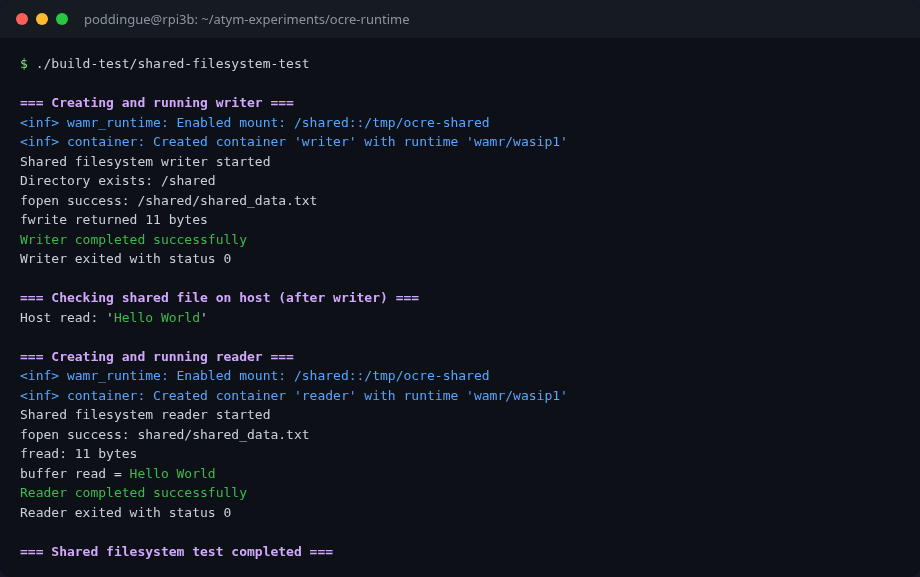
I ran two containers, a writer and a reader, with the same host directory (/tmp/ocre-shared) mounted as /shared inside both:
=== Writer ===
Shared filesystem writer started
Directory exists: /shared
fopen success: /shared/shared_data.txt
fwrite returned 11 bytes
Writer completed successfully

=== Host verification ===
Host read: 'Hello World'

=== Reader ===
Shared filesystem reader started
fopen success: shared/shared_data.txt
buffer read = Hello World
Reader completed successfully
The writer creates a file at /shared/shared_data.txt with “Hello World”. The host filesystem confirms the file exists. The reader, a completely separate container, reads it back. Data crosses the container boundary via a shared mount point.
Now, one detail that took me longer than I’d like to admit to debug: the mount format.
My first attempt failed with error while pre-opening mapped directory /shared: 2 – ENOENT. The host directory existed. I checked. I checked again. I stared at it.
I had to trace the mount string through three layers of source code to understand what was going on:
-
Ocre’s container creation code takes the mount argument and converts single colons to double colons. So
A:BbecomesA::Bbefore passing it to WAMR. -
WAMR’s
wasm_runtime_common.c(around line 3760) parses the::separator asguest_visible_name::host_real_path. Then it callsrealpath()on the host path. - I had been writing
/tmp/ocre-shared:/shared(Docker-style:host:guest). WAMR was reading that as “guest sees/tmp/ocre-shared, host provides/shared,” and callingrealpath("/shared"), which doesn’t exist on the host.
The fix: flip the order. Ocre’s mount format is guest_path:host_path, the opposite of Docker’s convention. Once I wrote /shared:/tmp/ocre-shared, it worked immediately.
A small thing, but the kind of small thing that eats an hour of your afternoon if you assume instead of reading the source.
How much does a container cost?
This is the payoff.
I created a test harness that launches hello-world.wasm containers sequentially, measuring VmRSS (resident memory) from /proc/self/status at each milestone:
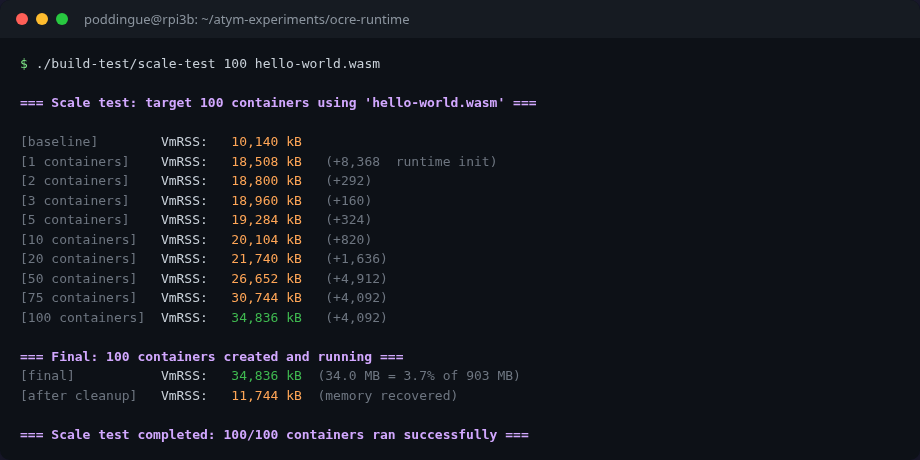
| Containers | VmRSS (KB) | VmRSS (MB) | Delta from previous | Per-container avg |
|---|---|---|---|---|
| 0 (baseline) | 10,224 | 10.0 | – | – |
| 1 | 18,512 | 18.1 | +8,288 (runtime init) | 8,288 KB |
| 2 | 18,804 | 18.4 | +292 | 292 KB |
| 3 | 18,964 | 18.5 | +160 | 160 KB |
| 5 | 19,288 | 18.8 | +324 (2 more) | 162 KB |
| 10 | 20,108 | 19.6 | +820 (5 more) | 164 KB |
| 20 | 21,744 | 21.2 | +1,636 (10 more) | 163 KB |
| 50 | 26,656 | 26.0 | +4,912 (30 more) | 164 KB |
| 100 | 34,840 | 34.0 | +8,184 (50 more) | 164 KB |
| After cleanup | 11,748 | 11.5 | – | – |
The numbers are consistent. After the first container – which pays the ~8.3 MB cost of initializing the WAMR runtime – every additional container costs approximately 164 KB of resident memory.
164 KB. Not megabytes. Kilobytes.
The hello-world.wasm file is 17 KB on disk. The per-container runtime overhead (164 KB) includes the WAMR module instance, initial Wasm linear memory pages, container metadata, and thread stack. And the memory drops right back down after cleanup. No leaks.
The comparison that matters
Here’s what those numbers look like next to Docker:
| Containers | Wasm total | Docker equivalent (estimated) |
|---|---|---|
| 0 (baseline) | 10 MB | ~113 MB (daemon + containerd, measured) |
| 5 | 19 MB | ~188 MB (daemon + 5 x 15 MB) |
| 10 | 20 MB | ~263 MB |
| 20 | 21 MB | ~413 MB |
| 50 | 27 MB | ~863 MB (if it even fits) |
| 100 | 34 MB | OOM killed on 903 MB board |
On a Pi 3B+ with 903 MB RAM:
- Wasm: 100 containers in 34 MB (3.8% of RAM). Room for hundreds more.
- Docker: would hit the OOM killer somewhere around 50-60 containers (~500+ MB).
That’s 6-13x less memory per container than Docker with Alpine. And these aren’t back-of-napkin estimates. I measured every data point on the actual hardware.
After 100 containers, the Ocre process itself used only 34 MB. Even with the OS and other services, the Pi had plenty of headroom. The bottleneck isn’t memory. It might be CPU scheduling or file descriptors, but I didn’t hit either limit at 100.
A historical footnote: the DockerCon Pi challenge
Before anyone says “Docker can run thousands of containers on a Pi too,” yes, it can. In 2015, Damien Duportal, Nicolas de Loof, and Yoann Dubreuil ran 2,500 web server containers on a single Raspberry Pi 2 as part of a DockerCon challenge. Nicolas pushed further to 2,740, tweeting:
#RpiDocker 2740 web servers running on a #Rpi, could have more. But using a patched docker daemon with a hack that isn’t a valuable fix.
– Nicolas de Loof (@ndeloof), October 13 2015
That’s an impressive number. But the context matters:
| Docker (2015 record) | Wasm/Ocre (this article) | |
|---|---|---|
| Board | Raspberry Pi 2 (1 GB) | Raspberry Pi 3B+ (903 MB) |
| Containers | 2,740 | 100 (tested, headroom for much more) |
| Per-container memory | ~300-400 KB (estimated, heavily tuned) | 164 KB (measured, no tuning) |
| Runtime overhead | Docker daemon + containerd: 113 MB (measured on Pi 3B+) | WAMR init ~8.3 MB |
| Hack required? | Yes (patched daemon) | No (stock Ocre runtime) |
The Docker record required heroic effort from three talented engineers and a patched daemon. My Wasm numbers are stock runtime, no tuning, and I stopped at 100 because the article needed to end somewhere, not because the Pi was struggling. Different era, different technology, but the density-by-default story favors Wasm.
Hat tip to Damien, Nicolas, and Yoann for pushing Docker’s limits on a Pi back when running containers on ARM was still considered slightly crazy. I liked that story so much it ended up in my Docker course.
Experiment 4: Isolation, what the sandbox actually enforces
Wasm containers don’t use Linux namespaces or cgroups. The isolation comes from WebAssembly’s design itself:
I wanted to know what “isolation” actually means when there are no Linux namespaces or cgroups. So I poked at it.
Each Wasm module gets its own linear memory. No shared address space, no pointer arithmetic across containers, no /proc/pid/mem to peek at. One container simply can’t read another’s memory. That’s not a kernel feature you enable; it’s how WebAssembly works at the bytecode level.
Filesystem access is equally strict: containers can only see directories explicitly mounted via WASI preopens. No mount, no access. I verified this in the shared-filesystem experiment: without the mount, the container has no filesystem visibility beyond its own working directory.
Then there’s SDK access. The Ocre runtime uses a capability model: when you create a container with ocre:api, the runtime registers its module context and grants access to timers, messaging, and sensors. Without this capability, the container starts but SDK calls silently fail.
I tested this explicitly. A publisher container without ocre:api starts just fine, but:
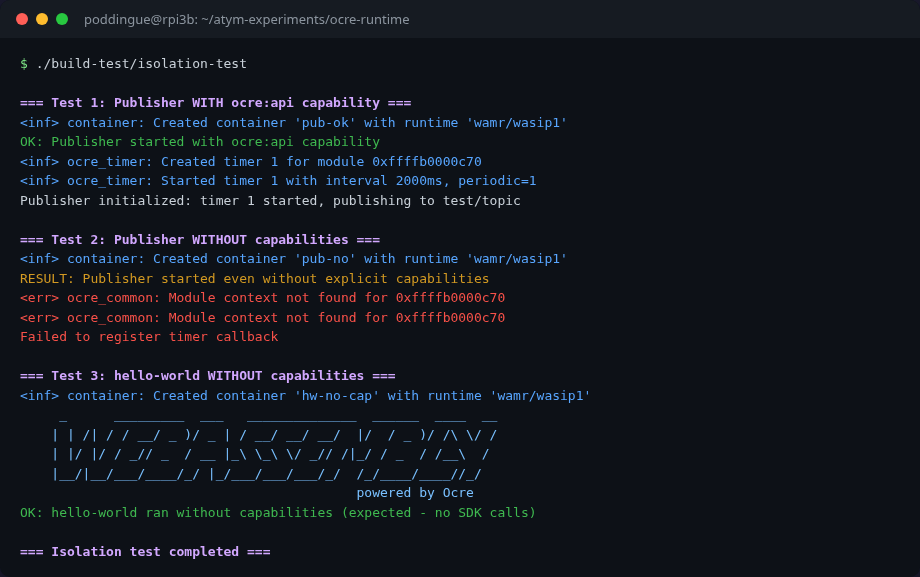
<err> ocre_common: Module context not found for 0xffffb0000c70
Failed to register timer callback
The container runs. It can do pure computation. But it can’t publish messages, create timers, or interact with the Ocre platform. The runtime doesn’t crash it. It just quietly refuses the privileged calls.
Is that the right behavior? Depends. I’d have saved 20 minutes of debugging if the runtime had just yelled at me instead of silently swallowing the error. But on a fleet of 200 devices, soft failure beats a restart storm. Docker’s --cap-add works differently: missing Linux capabilities typically cause hard EPERM errors that kill the operation. Ocre’s approach is gentler, and for embedded devices I think it’s the right call.
| Isolation layer | Mechanism | Verified |
|---|---|---|
| Memory | Wasm linear memory (no shared address space) | By design |
| Filesystem | WASI preopens (only mounted dirs accessible) | Experiment 3 |
| SDK access |
ocre:api capability (module registration) |
Experiment 4 |
| Inter-container comms | Topic-based messaging (requires ocre:api) |
Experiments 1-2 |
Is this as strong as Docker’s namespace isolation? In some ways, stronger: memory isolation is architectural, not dependent on kernel configuration. In other ways, it’s just different. There’s no network namespace isolation or process isolation because Wasm modules don’t have processes or network stacks. The threat model is different. On embedded devices where you control the entire software stack, I’d rather have Wasm’s model than try to shoehorn Linux container semantics onto a 903 MB board.
The commercial stack: not self-service (yet)
Everything in this article uses the open-source Ocre runtime and the Ocre C API. But Atym also ships a commercial layer: a CLI for building and pushing containers, a device runtime agent, and a cloud Hub for fleet management and remote deployment.
The commercial stack is available as pre-built arm64 binaries. I installed the Atym CLI (v1.0.6, via apt) and downloaded the Linux runtime (3.9 MB, aarch64) on the Pi. The tools exist and they work. But when I tried to actually connect to the Hub, I hit a wall: there’s no self-service sign-up.
If you’ve used Balena, you know the drill: go to the website, create a free account, add a device, flash an SD card, and you’re deploying containers remotely within minutes. Balena’s onboarding is self-service from start to finish. You can evaluate the entire platform without talking to a single human.
Atym doesn’t work like that today. To get Hub access, you need to contact their evaluation program (eval@atym.io) and wait for credentials. The CLI has atym login which opens a browser for authentication, and atym add device which registers a board and returns device credentials. The runtime agent connects to the Hub via CoAP on port 5684. The architecture makes sense, same model as Balena: a lightweight agent on the device phones home to a cloud orchestrator. But the front door is locked.
This matters more than it might seem. Developers evaluate tools by trying them, not by sending emails and waiting. Balena figured this out early: their free tier (up to 10 devices) is what turned weekend hobbyists into paying fleet customers. Atym’s technology is solid, but until there’s a “sign up and try it” path, the open-source Ocre runtime is the only way to get your hands dirty.
For this article, that was fine. The Ocre C API gave me everything I needed: multi-container orchestration, messaging, shared filesystems, and capability-based isolation. The commercial stack would add remote deployment and fleet management on top, but everything I tested in this article runs on the open-source Ocre runtime alone.
What I learned
I came into this experiment expecting Wasm containers to be lighter than Docker. I didn’t expect the gap to be this wide.
100 containers in 34 MB of RAM on a board with less than a gigabyte. 164 KB per container, consistent from container 2 through container 100. Memory fully reclaimed on cleanup. Those aren’t projections. I measured them.
The messaging worked out of the box: topic-based pub/sub with prefix matching, no configuration, no broker process, just start containers and they talk. Three containers communicating without me having to set up a single thing beyond the runtime.
The filesystem sharing uses Docker-style volume mounts. It works across container boundaries. It also uses the opposite argument order from Docker, which cost me an hour. Read the source.
The isolation model is different from Docker’s but not weaker. Memory separation is architectural. Filesystem access is explicit. SDK capabilities are opt-in. It’s a different set of tradeoffs, and for embedded devices, I think it’s the right set.
The Pi 3B+ is the low end of what Atym and Ocre target. On a Raspberry Pi 4 with 4 GB, or a Pi 5 with 8 GB, you could run thousands of containers with these memory characteristics. For fleet deployments across dozens of edge devices, each running 10-20 application containers, the math works in a way Docker on ARM never did comfortably.
I’m still a Docker Captain, and I still run Docker on these boards for workloads that need it. But for lightweight, purpose-built applications like sensor readers, data aggregators, protocol translators, watchdogs? On memory-constrained hardware, Wasm is the better tool. It’s not close.