Running a Local LLM on RISC-V: Building llama.cpp on a Banana Pi F3 (Part 1)
TL;DR
I built llama.cpp from source on a Banana Pi F3 (SpacemiT K1, riscv64), ran TinyLlama 1.1B, and got an OpenAI-compatible API server running at ~8.5 tokens/second (8.29 in benchmarks, 8.76 on short queries). There’s a build gotcha with RISC-V vector extensions and float16 support that will bite you if you follow the generic instructions. This is Part 1 of a series about running AI locally on RISC-V hardware.
Previously, on “Docker Captain vs. RISC-V”
In the previous article, I containerized OpenClaw (an AI gateway) for riscv64. Cross-compiled the build stage on amd64 where rolldown works, ran the result on a Banana Pi F3. Docker images on GHCR and Docker Hub. Automated pipeline. The whole thing.
But OpenClaw is a gateway. It routes conversations to AI providers. By default, those providers are cloud APIs: OpenAI, Anthropic, Google. My riscv64 board is doing network I/O to somebody else’s GPU cluster. Not exactly “local AI.”
Then Oleg Selajev published a guide on running OpenClaw inside Docker Sandboxes with Docker Model Runner. Fully local. No API keys exposed. The AI runs on your machine.
One problem: Docker Model Runner doesn’t exist on riscv64.
$ docker model
docker: unknown command: docker model

$ docker sandbox
docker: unknown command: docker sandbox
No docker model. No docker sandbox. Docker Desktop features, x86/ARM only. But the engine behind Docker Model Runner is llama.cpp, and llama.cpp has RISC-V support. So skip the abstractions, go straight to the metal.
The Hardware
The Banana Pi F3 is a board I received through the RISC-V DevBoard program. Quick specs:
- SoC: SpacemiT K1 / X60, 8 cores @ 1.6 GHz
- RAM: 16 GB (14 GB available after OS)
- Storage: 116 GB eMMC, 61 GB free
- OS: Armbian 25.11.2 trixie (Debian 13)
- Kernel: 6.6.99-current-spacemit
- Docker: v29.2.1 (running natively)
- Node: v22.22.0 (unofficial-builds)
- GCC: 14.2.0
- cmake: 3.31.6
- Power: Pine64 desktop PSU
It also runs a self-hosted GitHub Actions runner using ChristopherHX’s github-act-runner, which is how the OpenClaw riscv64 Docker images get built. But today it’s doing something different: compiling and running an LLM inference engine.
A CI Detour
The OpenClaw riscv64 pipeline needed two fixes before the v2026.2.25 build would go through. Not directly related to llama.cpp, but context for anyone following the series.
Fix 1: sync-upstream.yml dispatch target. The workflow that auto-triggers riscv64 builds on new upstream tags was calling gh workflow run riscv64-release.yml without specifying -R. GitHub CLI defaults to the upstream repo (because the fork tracks it), so the dispatch went to openclaw/openclaw instead of gounthar/openclaw. HTTP 404. Fix: add -R "$GITHUB_REPOSITORY".
Fix 2: release creation permissions. gh release create was failing with HTTP 403, “Resource not accessible by integration.” The default GITHUB_TOKEN doesn’t have permission to create releases that reference commits from upstream tags. Switching to a Personal Access Token ($) fixed it.
After rebasing the fork onto upstream/main (9 fork-only commits, all touching fork-specific files), the v2026.2.25 riscv64 build triggered and completed in 39 minutes. Pipeline healthy again.
Building llama.cpp: Attempt 1 (The One That Failed)
SSH into the board. Clone llama.cpp:
git clone --depth 1 https://github.com/ggml-org/llama.cpp.git ~/llama.cpp
cd ~/llama.cpp
mkdir build && cd build
I went with what seemed like the right flags for a board with RISC-V Vector extension support:
cmake .. \
  -DGGML_NATIVE=ON \
  -DGGML_CPU_ALL_VARIANTS=ON \
  -DGGML_BACKEND_DL=ON \
  -DLLAMA_BUILD_SERVER=ON
GGML_CPU_ALL_VARIANTS=ON tells llama.cpp to build multiple CPU backend variants and pick the best one at runtime. On riscv64, cmake detected two:
-
riscv64_0(scalar): baseline, no vector extensions -
riscv64_v(RVV): with-march=rv64gc_vfor RISC-V Vector support
Build with -j 8. The scalar variant compiled fine. Then the RVV variant hit a wall:
ggml/src/ggml-cpu/vec.h:95:34: error: 'GGML_F16_VEC' undeclared
ggml/src/ggml-cpu/vec.h:95:49: error: 'GGML_F16_STEP' undeclared
ggml/src/ggml-cpu/vec.h:95:65: error: 'GGML_F16_EPR' undeclared
ggml/src/ggml-cpu/simd-mappings.h:860:26: error: 'GGML_F16_VEC' undeclared
What went wrong
The generic RVV code path uses -march=rv64gc_v. The v extension gives you vector instructions, but not float16 vector support. That lives in the zvfh extension.
The SpacemiT K1’s cores (X60) do support zvfh. But when llama.cpp builds the generic RVV variant, it uses only v. The F16 SIMD macros (GGML_F16_VEC, GGML_F16_STEP, GGML_F16_EPR) are conditionally defined based on zvfh being present. With plain v, they’re not defined. Build fails.
This is a gap in llama.cpp’s RISC-V build configuration. The ALL_VARIANTS mode assumes the RVV variant can compile with just -march=rv64gc_v, but the SIMD mapping code requires float16 vector support that isn’t part of the base v extension. The fix would be either making F16 macros optional in the RVV path, or adding a separate riscv64_v_zvfh variant. Worth reporting upstream.
Building llama.cpp: Attempt 2 (The One That Worked)
Drop the multi-variant approach. Let cmake auto-detect the full native CPU feature set:
rm -rf build && mkdir build && cd build
cmake .. \
  -DGGML_NATIVE=ON \
  -DLLAMA_BUILD_SERVER=ON
cmake --build . -j 8
cmake probed the CPU via /proc/cpuinfo:
isa : rv64imafdcv_zicbom_zicboz_zicntr_zicond_zicsr_zifencei_zihintpause
      _zihpm_zfh_zfhmin_zca_zcd_zba_zbb_zbc_zbs_zkt_zve32f_zve32x_zve64d
      _zve64f_zve64x_zvfh_zvfhmin_zvkt_sscofpmf_sstc_svinval_svnapot_svpbmt
From that wall of extensions, cmake extracted what it needs for the build:
-march=rv64gc_zfh_v_zvfh_zicbop_zihintpause
That’s RVV (v) AND scalar float16 (zfh) AND vector float16 (zvfh). Plus cache prefetch hints (zicbop) and spin-loop optimization (zihintpause). With zvfh in the march string, the F16 macros get properly defined.
41 minutes later, the build completed. Three binaries that matter:
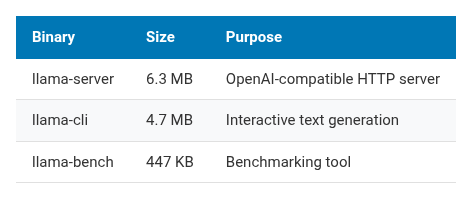
| Binary | Size | Purpose |
|---|---|---|
llama-server |
6.3 MB | OpenAI-compatible HTTP server |
llama-cli |
4.7 MB | Interactive text generation |
llama-bench |
447 KB | Benchmarking tool |
Getting a Model
16 GB of RAM. After the OS takes its share, about 14 GB available. I need a model that fits comfortably with room for context.
TinyLlama 1.1B in Q4_K_M quantization: 638 MB. Small enough to leave plenty of headroom.
mkdir -p ~/models
cd ~/models
wget https://huggingface.co/TheBloke/TinyLlama-1.1B-Chat-v1.0-GGUF/resolve/main/tinyllama-1.1b-chat-v1.0.Q4_K_M.gguf
638 MB download. On the board’s ethernet, a few minutes.
Benchmarking
Time to see what this hardware can do:
~/llama.cpp/build/bin/llama-bench \
  -m ~/models/tinyllama-1.1b-chat-v1.0.Q4_K_M.gguf \
  -t 8
Results:
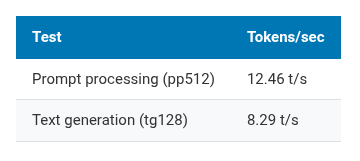
| Test | Tokens/sec |
|---|---|
| Prompt processing (pp512) | 12.46 t/s |
| Text generation (tg128) | 8.29 t/s |
For comparison, community benchmarks put a Raspberry Pi 5 (ARM Cortex-A76, 2.4 GHz) at roughly 15-20 t/s on generation with similar models. The SpacemiT K1 at 1.6 GHz is slower. Different ISA, lower clock, less mature compiler optimizations. Expected.
8.29 tokens per second means about 7-8 words per second. You can read the output as it streams. Not instant, but not painful either.
Starting the Server
~/llama.cpp/build/bin/llama-server \
  -m ~/models/tinyllama-1.1b-chat-v1.0.Q4_K_M.gguf \
  --host 0.0.0.0 \
  --port 8080 \
  -t 8
The server starts, loads the model, and exposes an OpenAI-compatible API. The same API format that OpenClaw, LiteLLM, and dozens of other tools expect. No adapter needed.
Note: This runs in the foreground. Close your SSH session and the server dies. For anything persistent, wrap it in
tmux,screen, or a systemd unit. I’m just testing for now, so foreground is fine.
Verifying the API
Check the models endpoint:
$ curl -s http://<board-ip>:8080/v1/models | python3 -m json.tool
{
    "object": "list",
    "data": [
        {
            "id": "tinyllama-1.1b-chat-v1.0.Q4_K_M.gguf",
            "object": "model",
            "created": 1740688830,
            "owned_by": "llamacpp"
        }
    ]
}
Now the real test:
curl -s http://<board-ip>:8080/v1/chat/completions \
  -H "Content-Type: application/json" \
  -d '{
    "model": "tinyllama-1.1b-chat-v1.0.Q4_K_M.gguf",
    "messages": [
      {"role": "user", "content": "What is RISC-V in one sentence?"}
    ],
    "max_tokens": 64
  }'
Response came back in about 7.3 seconds. 64 tokens generated:
- Prompt processing: 12.85 t/s (28-token prompt)
- Text generation: 8.76 t/s (64-token response)
Slightly better than the benchmark numbers, within normal variance for short sequences.
Here’s what TinyLlama answered:
RISC-V is an open-source instruction set architecture (ISA) that provides a flexible and customizable framework for designing processors, enabling a wide range of applications from embedded systems to high-performance computing.
Not bad for a 638 MB brain. TinyLlama 1.1B won’t write your PhD thesis, but it can hold a conversation and follow basic instructions. For a $100 board with no GPU, I’ll take it.
The build gotcha, explained
The RVV float16 issue matters because it affects anyone building llama.cpp on RISC-V.
The RISC-V Vector extension (v) is not one thing. It’s a base spec combined with sub-extensions:
-
v: base vector operations (integer, single and double-precision float, but no float16) -
zvfh: vector float16 operations -
zfh: scalar float16 operations -
zvfhmin: minimal vector float16 (conversion only, no arithmetic)
llama.cpp’s SIMD mapping assumes that vector support implies float16 vector support. True for the SpacemiT X60 and most modern RISC-V cores. But cmake’s ALL_VARIANTS mode uses only -march=rv64gc_v, which doesn’t declare float16 capability. The compiler doesn’t define the right macros. Build fails.
The workaround: GGML_NATIVE=ON without GGML_CPU_ALL_VARIANTS=ON. cmake reads the actual CPU features from /proc/cpuinfo and generates the full march string. On this board, that includes zvfh. Everything compiles.
For cross-compilation targeting a known board, set the march string manually:
cmake .. \
  -DGGML_NATIVE=OFF \
  -DCMAKE_C_FLAGS="-march=rv64gc_zfh_v_zvfh" \
  -DCMAKE_CXX_FLAGS="-march=rv64gc_zfh_v_zvfh" \
  -DLLAMA_BUILD_SERVER=ON
Where things stand
After an afternoon on the Banana Pi F3:
- llama.cpp compiles and runs natively on riscv64
- TinyLlama 1.1B at ~8.7 t/s generation, ~12.5 t/s prompt processing
- OpenAI-compatible API server works on port 8080
- The build requires attention to RISC-V extension flags (use
GGML_NATIVE=ON, avoidALL_VARIANTSfor now)
This board is now running two things: a GitHub Actions runner building OpenClaw Docker images, and an LLM inference server. On 8 watts.
What’s next (Parts 2 and 3)
Part 2: Wire the OpenClaw container to this llama-server. OpenClaw supports custom OpenAI-compatible endpoints. Point it at http://host.docker.internal:8080/v1, set apiKey: not-needed, and route conversations through the local model. No cloud, no API keys, no egress traffic.
Part 3: Package the whole thing as a docker-compose stack. Service 1: llama.cpp server with a model volume mount. Service 2: OpenClaw gateway configured to talk to it. docker compose up, send a message on Telegram, get a response from a 1.1B model running on a RISC-V board on your desk.
8.7 tokens/second won’t serve multiple users. But the AI stack runs locally, on open hardware, with open software. No API keys. No data leaving the network. For a personal setup, that matters more than speed.
Slow, early, and it works.
Bruno Verachten is a Docker Captain and Developer Relations engineer. The Banana Pi F3 came from the RISC-V DevBoard program. “docker model: unknown command” was all the motivation he needed.