
When a Docker Captain Puts an AI Tool in a Container on RISC-V (Because Of Course He Does)
TL;DR
OpenClaw is one of those AI assistant tools that’s been making the rounds lately. My reflex when I see popular software? Two questions: can I run it on RISC-V, and can I stuff it in a container? Spoiler: yes and yes. But getting there involved missing native binaries, cross-compilation gymnastics, a credential store that’s apparently case-sensitive (who knew?), and the kind of patience that only QEMU can teach you.
The Setup
I have a BananaPi F3 sitting on my desk. SpacemiT K1 SoC, 16GB of RAM, running Armbian trixie on riscv64. It’s my favourite board for answering the question nobody else seems to ask: does this actually work beyond x86 and ARM? Usually the answer is "not yet." Sometimes it’s "sort of." Today it’s going to be "yes, but."
OpenClaw caught my eye. It’s an AI gateway/assistant that integrates with everything: Telegram, Discord, Slack, Signal, even WhatsApp. Makes you wonder if your toaster needs an AI layer too. Distributed via npm, with Docker images for the architectures that polite society cares about. Nothing for RISC-V, obviously.
Challenge accepted.
Act 1: The npm Path (Spoiler: It Just Works)
Before reaching for Docker, let’s try the simple path. SSH into the BananaPi, install Node.js 22 from unofficial-builds (because the Node.js project doesn’t ship official riscv64 binaries yet), and:
npm install -g openclaw@latestTwenty-three minutes later (grab a coffee, read some email, contemplate life choices), it’s done. For comparison, the same install takes about two minutes on amd64. The gap? node-llama-cpp compiling from source via cmake/g++ because there’s no prebuilt binary for riscv64. But it compiles. And it works. Twenty-three minutes well spent.
$ openclaw --version
2026.2.24

$ openclaw doctor
== All checks pass
It works. On RISC-V. Natively. I could stop here.
But I’m a Docker Captain. I can’t stop here.
Act 2: The Docker Wall
OpenClaw’s build system uses tsdown, which is powered by rolldown, a Rust-based JavaScript bundler.
Rolldown ships precompiled native binaries for the platforms people actually use: linux-x64, linux-arm64, darwin-x64, darwin-arm64, win32-x64.
Not linux-riscv64.
Error: Cannot find module '@rolldown/binding-linux-riscv64-gnu'
If you’ve ever ported anything to RISC-V, you know this script by heart. The runtime? Works. The pure JavaScript? Works. The build toolchain that produces that JavaScript? Nope. Native dependencies. No riscv64.
The funny part? esbuild (used by Vite for UI builds) already ships @esbuild/linux-riscv64.
Rolldown, being newer, hasn’t caught up yet.
That’s the riscv64 ecosystem in a nutshell. It grows one package at a time, and you either learn patience or you learn to cross-compile.
Act 3: Cross-Compilation, or Docker BuildKit to the Rescue
The moment I figured it out, I felt silly for not seeing it sooner: tsdown’s output is pure JavaScript. The bundler needs native binaries to run, but what it produces is plain JS. Architecture-independent. Portable.
And Docker BuildKit has exactly the mechanism for this: --platform=$BUILDPLATFORM.
Run the build stages on whatever architecture your host is (amd64, most likely), then target riscv64 for the final image.
I’ve used this trick on ARM boards more times than I can count. Same playbook, different ISA.
== Stage 1: build on host arch (amd64)
FROM --platform=$BUILDPLATFORM node:22-trixie AS builder
== rolldown/tsdown works fine on amd64
RUN pnpm install --frozen-lockfile
RUN pnpm build    # Pure JS output
RUN pnpm ui:build # Also pure JS output

== Stage 2: runtime on riscv64
FROM gounthar/node-riscv64:22.22.0-trixie
== Copy the architecture-independent JS artifacts
COPY --from=builder /app/dist ./dist
COPY --from=builder /app/src/canvas-host/a2ui/ ./src/canvas-host/a2ui/
== Install runtime deps (node-llama-cpp compiles from source here)
RUN pnpm install --frozen-lockfile
Build the JS where the tools work. Run it where we want it. Obvious in hindsight. Took me longer than I’d like to admit to get there.
Act 4: The Dockerfile.riscv64 Approach
My first attempt was… not great. I shoved per-architecture conditional stages into the main Dockerfile.
Terrible idea. It doubled pnpm install time for everyone on amd64/arm64.
Rule number one when you’re porting to a niche architecture: don’t break the builds of the people who are actually using it in production.
The better approach: a separate Dockerfile.riscv64.
Zero impact on existing builds.
The CI workflow overlays it onto upstream tags via sparse checkout:
* name: Overlay Dockerfile.riscv64 from fork main
  uses: actions/checkout@v4
  with:
    ref: main
    sparse-checkout: Dockerfile.riscv64
    sparse-checkout-cone-mode: false
    path: _fork
This lets us track upstream releases without modifying their code. Just add our riscv64 Dockerfile on top.
The full Dockerfile has a few more tricks worth mentioning.
Bun has no riscv64 binary (surprise, surprise), so the runtime stage installs a stub script in /usr/local/bin/bun that exits with an explicit error. Silent failures at 2 AM are nobody’s idea of fun.
And node-llama-cpp needs cmake, g++, and make to compile from source on riscv64, so those get installed in the runtime stage too. Yes, build tools in the runtime image. Don’t @ me.
The Bots Were Smarter Than Me
I’ll give credit where it’s due: the automated review bots caught real bugs.
Copilot noticed my COPY only grabbed a2ui.bundle.js from the builder stage — I’d forgotten index.html and the bundle hash file. The UI would have been silently broken at runtime. Nice.
CodeRabbit spotted that I’d placed the bun stub in /root/.bun/bin, which the node user (that the container actually runs as) can’t see.
Easy fixes, both of them. Without the bots, I’d have found out at 2 AM in production.
Act 5: Testing on Real Iron
Docker Pull Adventures
First obstacle: GHCR packages from forks default to private. Right. Made it public.
Second obstacle: this one’s embarrassing.
Docker’s credential store is case-sensitive.
I had an old ghcr.IO entry (uppercase, don’t ask) that was silently blocking pulls from ghcr.io (lowercase).
Took me way too long to figure out. The fix:
docker logout ghcr.io
docker logout ghcr.IO
After that, anonymous pull worked fine.
Running the Image (v2026.2.23, First Build)
$ docker run --rm ghcr.io/gounthar/openclaw:2026.2.23-riscv64 \
    node openclaw.mjs --version
2026.2.23
But openclaw doctor hit a wall:
WebAssembly.instantiate(): Out of memory
OpenClaw uses llama.cpp compiled to WebAssembly for its health check. WASM memory allocation on riscv64 is way hungrier than on amd64, probably page size differences (riscv64 kernels often use 16KB or 64KB pages vs 4KB on x86). I didn’t dig deeper. I just threw more RAM at it:
$ docker run --rm --memory=4g ghcr.io/gounthar/openclaw:2026.2.23-riscv64 \
    node openclaw.mjs doctor
== All checks pass
Act 6: Going Multi-Registry and Automating
Because one registry is never enough (I collect registries like some people collect stamps), the workflow now pushes to both GHCR and Docker Hub.
And because clicking "Run workflow" manually is for people with more patience than me, I set up the upstream sync workflow to auto-dispatch a riscv64 build whenever a new stable release tag appears. Except it didn’t work. Of course it didn’t.
The GitHub Actions Anti-Recursion Trap
Here’s a fun one that cost me an hour of staring at "no workflow runs found": GitHub Actions does not trigger on: push: tags for tags pushed from within another workflow. Even with a Personal Access Token.
It’s GitHub’s anti-recursion protection: workflow A can’t trigger workflow B can’t trigger workflow A. Fair enough, but the documentation on this is… let’s say discreet.
The workaround is explicit: instead of relying on the tag push event, the sync workflow calls gh workflow run riscv64-release.yml directly with the tag as an input parameter.
It loops over all new stable tags (filtering out betas and RCs), so if the sync catches up on multiple releases at once, each one gets its own build.
== Inside the sync workflow
for tag in "${sorted_tags[@]}"; do
  gh workflow run riscv64-release.yml -f tag="$tag"
done
Not elegant, but reliable. And reliability beats elegance in CI.
v2026.2.24 — Docker Hub Confirmed
The first build pushed to both registries. Pulled straight from Docker Hub onto the BananaPi:
$ docker pull gounthar/openclaw:2026.2.24-riscv64
== ...
Status: Downloaded newer image for gounthar/openclaw:2026.2.24-riscv64

$ docker run --rm gounthar/openclaw:2026.2.24-riscv64 \
    node openclaw.mjs --version
2026.2.24

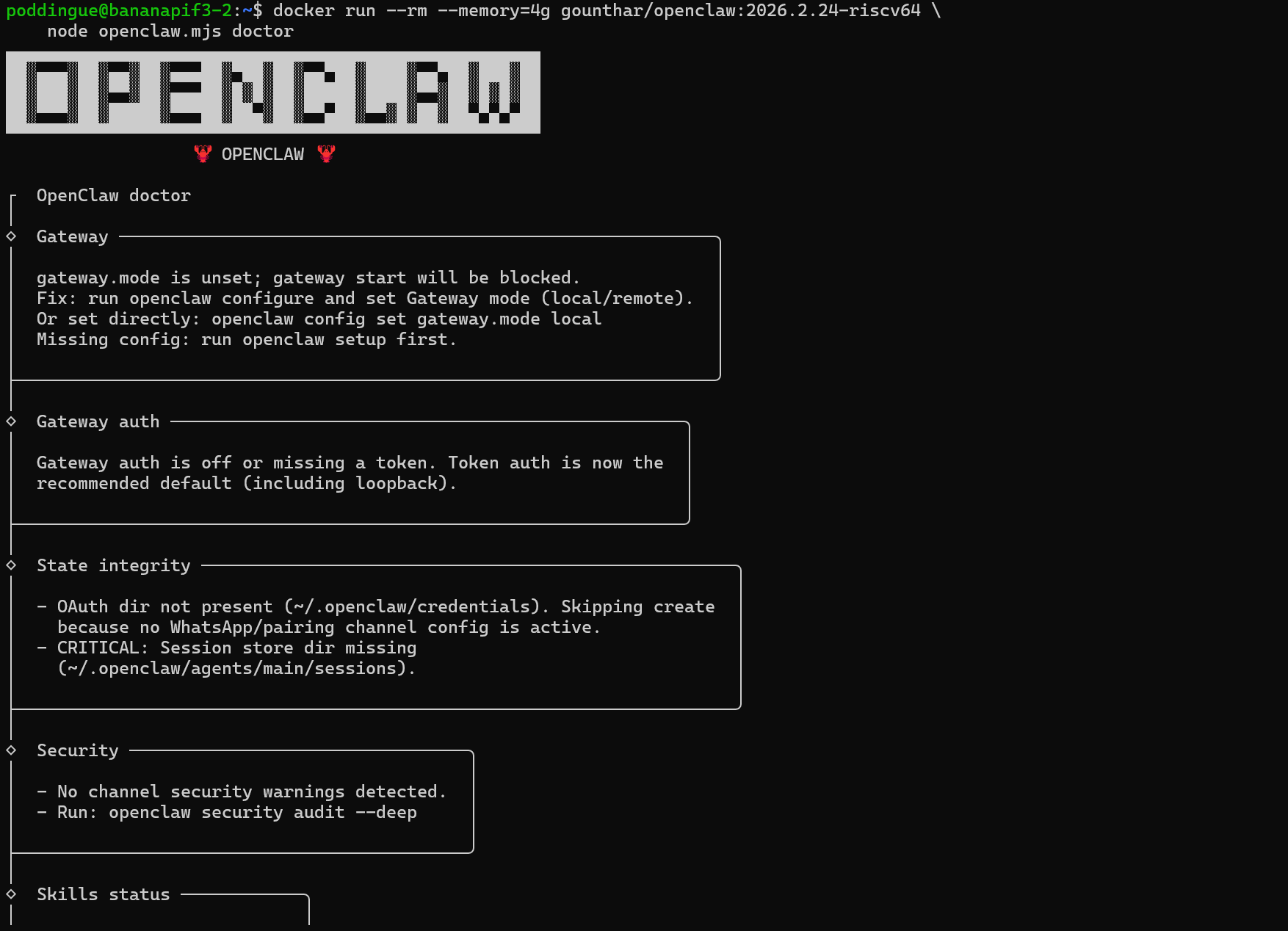
$ docker run --rm --memory=4g gounthar/openclaw:2026.2.24-riscv64 \
    node openclaw.mjs doctor
Doctor output on riscv64, everything checks out:
┌  OpenClaw doctor
│
◇  Gateway ─────────────────────────────────────────────────────
│  gateway.mode is unset; gateway start will be blocked.
│  Fix: run openclaw configure and set Gateway mode (local/remote).
├───────────────────────────────────────────────────────────────
│
◇  Security ────────────────────────────
│  No channel security warnings detected.
├───────────────────────────────────────
│
◇  Skills status ──────────
│  Eligible: 3
│  Missing requirements: 48
│  Blocked by allowlist: 0
├──────────────────────────
No errors. Gateway is unconfigured (expected for a fresh container), security is clean, skills engine is ready. The full AI stack runs on RISC-V.
One caveat: openclaw doctor --fix is greedier. In Docker it needs --memory=8g, and on the bare metal BananaPi (16GB of RAM, no container limits) it crashes with WebAssembly.instantiate(): Out of memory. That’s not a RAM problem, it’s V8’s default heap ceiling (~4GB) being hit earlier on riscv64 due to larger page sizes. The fix:
NODE_OPTIONS="--max-old-space-size=8192" openclaw doctor --fixWith that, --fix runs fine on bare metal: configures the gateway token, creates missing directories, the works.
Both registries serving the same image:
== Docker Hub
docker pull gounthar/openclaw:2026.2.24-riscv64

== GHCR
docker pull ghcr.io/gounthar/openclaw:2026.2.24-riscv64
Lessons Learned
A full day of porting, testing, and swearing at credential stores. Here’s where things stand.
What Works on RISC-V (today)
Node.js 22 (via unofficial-builds)
npm installwith native compilation (node-llama-cpp builds from source)esbuild (has riscv64 native binaries)
Docker cross-compilation via BuildKit
Honestly? Further along than most people think. The gaps are real, but they’re workable.
What Doesn’t Work (yet)
rolldown/tsdown (no
@rolldown/binding-linux-riscv64-gnu)Bun (no riscv64 binary)
Playwright/Chromium (no riscv64 browser binaries)
Official Node.js Docker images for riscv64
None of these are if, they’re all when. esbuild added riscv64 support without anyone making a fuss about it. rolldown will get there. Bun… well, Bun will get there eventually.
The Cross-Compilation Pattern
If your build tool lacks riscv64 support but produces architecture-independent output (JS, HTML, CSS, WASM), cross-compile:
Build on the host’s native arch with
--platform=$BUILDPLATFORMCopy artifacts to the riscv64 runtime stage
Install only runtime dependencies on riscv64
This works for any bundler or transpiler that produces portable output. And most of them do. That’s the whole point of JavaScript, isn’t it?
RISC-V Docker Tips
Use
debian:trixieas base (bookworm has no riscv64)Node.js: unofficial-builds or custom images (like gounthar/node-riscv64)
WASM-heavy workloads need explicit
--memory=4g(or8gfordoctor --fix)QEMU builds take 60-90 minutes (vs ~10 minutes for amd64); budget accordingly in CI
Check credential case sensitivity if GHCR pulls fail mysteriously
What’s Next
The fork now auto-tracks upstream: every 6 hours, the sync workflow checks for new release tags and dispatches riscv64 builds automatically. No manual intervention needed. From upstream release to Docker Hub image, it’s fully hands-off.
The upstream PR (#12033) adds riscv64 as an optional build target for the main project. If merged, every OpenClaw release would natively include a riscv64 image without needing the fork.
But Wait, There’s a Whole Zoo
OpenClaw isn’t the only game in town. A Reddit comparison thread lists a frankly absurd number of alternatives: PicoClaw, NanoClaw, ZeroClaw, TinyClaw, IronClaw, Pinchy, ZeptoClaw, NanoBot… I haven’t tried any of them on RISC-V yet. But I’m tempted.
PicoClaw and NanoClaw are lighter, probably a better fit for boards with 4GB or 8GB of RAM. ZeroClaw takes a minimalist approach that might sidestep the native binary problem entirely (fewer dependencies = fewer things to cross-compile). IronClaw and Pinchy are heavier beasts that would really stress-test the cross-compilation pattern.
The good news: everything in this article (the Dockerfile.riscv64 pattern, the BuildKit $BUILDPLATFORM trick, the QEMU CI pipeline) is reusable.
If the tool uses Node.js and its build output is plain JS, the recipe is the same.
Which ones are actually worth running on RISC-V? I’ll find out. That’s the next article.